Project Roadmap Keynote Template: A Practical Evaluation
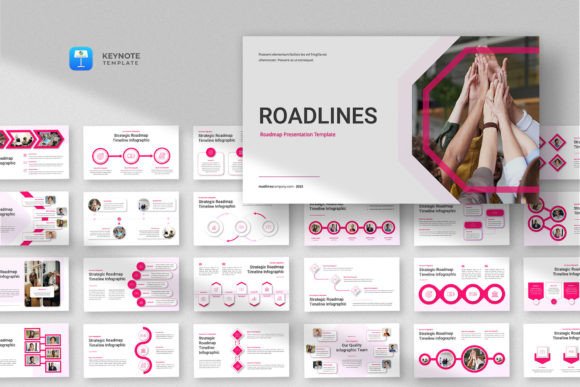
In the realm of corporate presentations, conveying complex timelines and strategic plans clearly is a constant challenge. The Project Roadmap Keynote Template, often paired with the complementary Roadlines design, is a presentation toolkit designed to address this need. It is a downloadable digital product comprising a set of pre-designed slides within a Keynote .KEY file, intended for users of Apple's Keynote presentation software.
Understanding the Template's Core Offering
This template is fundamentally a framework. It provides a structured starting point for creating presentations that focus on project roadmaps, business timelines, marketing strategies, and similar infographic-heavy content. The description emphasizes a simple, clean, minimalist, and professional aesthetic. With 25 total slides, resizable and editable graphics, and support for a 16:9 wide-screen layout, it aims to reduce the design and formatting time typically required to build such presentations from scratch. The inclusion of drag-and-drop image placeholders and 100 free fonts (presumably those available within Keynote or system fonts) points to a focus on customization within a guided structure.
Potential Reasons for Interest and Key Benefits
Individuals and teams might consider this template for several practical reasons. The primary benefit is efficiency. For professionals who are not graphic designers but need to produce high-quality, visually coherent roadmap presentations regularly, a well-structured template can significantly accelerate the production process. It ensures a consistent visual language across slides, which is crucial for maintaining professional credibility and audience engagement during strategic reviews or stakeholder updates.
Another key advantage is the focus on infographic elements. Designing timeline graphics, milestone markers, and process flows can be time-consuming. A template that offers these as editable components allows the presenter to concentrate on content and narrative rather than the mechanics of shape alignment and color coordination. The minimalist design philosophy also helps avoid visual clutter, directing the audience's attention to the project data and strategic message itself.
Important Considerations and Tradeoffs
Evaluating this template requires a clear understanding of its scope and limitations. First, it is exclusively for Apple Keynote. Users who operate in environments standardized on Microsoft PowerPoint or Google Slides would need to seek alternatives or face the friction of file conversion, which can often disrupt carefully crafted graphics and layouts.
The promise of "resizable and editable graphics" is central, but the actual ease and depth of editing depend on the user's familiarity with Keynote's tools. While placeholder systems simplify image insertion, modifying complex vector-based infographic elements might require a moderate level of software proficiency. The "100 free fonts" likely refer to standard system fonts, meaning truly unique typography would require external font installation.
A critical note from the provider states that all images shown in previews are for demonstration only and not included in the file. This means users must supply all their own imagery, logos, and background photos. This is a common practice in template markets, but it underscores that the template provides the structure and vessel, not the specific content.
Situations Where This Template is a Strong Fit
The Project Roadmap Keynote Template is particularly well-suited for specific scenarios. It aligns strongly with the needs of project managers, product leads, and marketing strategists within organizations that use Keynote as their presentation standard. These professionals often need to present phased plans, quarterly reviews, or launch timelines to internal teams, executives, or clients. A template that provides a ready-made visual framework for these narratives can be invaluable.
It is also a potential fit for consultants or freelancers who deliver strategy presentations as part of their services. Using a professional, clean template can enhance the perceived value of their deliverables without investing in custom design for each client engagement. For individuals tasked with creating a single, high-stakes roadmap presentation—such as a funding pitch or a major initiative proposal—the template offers a way to achieve a polished look quickly, even with limited design experience.
When Alternatives Might Be Worth Exploring
There are clear situations where other options should be considered. If your organization's software ecosystem is built around PowerPoint, dedicated PowerPoint roadmap templates would be a more seamless choice, avoiding potential compatibility issues. Similarly, for teams that collaborate heavily in cloud-based environments, templates native to Google Slides might offer superior real-time co-editing features.
For presentations that require extreme brand specificity—where every color, shape, and font must adhere to strict brand guidelines—a generic minimalist template might require more modification than it saves. In such cases, it might be more effective to use company-owned master slides or invest in a custom-designed template. Furthermore, if your roadmap presentation needs are exceptionally simple—perhaps just a few bullet points on a timeline—the effort of adapting a 25-slide template might outweigh the benefit. Using Keynote's basic built-in chart tools could suffice.
Practical Decision-Making Insights
To determine if the Project Roadmap Keynote Template aligns with your needs, conduct a practical assessment. First, confirm your software commitment: will you be using Keynote for the foreseeable future? Next, audit your typical presentation content: do you frequently need to show timelines, phases, milestones, and progress indicators in a visual format? If so, the infographic focus is relevant.
Evaluate your own or your team's design skill level. Can you comfortably edit graphic elements in Keynote? If the answer is yes, the template's editable components become a true asset. If the answer is no, consider whether the template's default look, with your content inserted, is acceptable for your audiences. Finally, consider the scale. For a one-off need, the value might be marginal. For recurring use across multiple projects and teams, the standardization and efficiency gains could be substantial.
In essence, this template is a tool for balancing quality with speed. It does not automate content creation, nor does it substitute for strategic thinking. Instead, it provides a visual scaffold upon which your project narrative can be clearly and professionally built. Its value is directly proportional to how well your specific requirements match its designed purpose: creating clean, modern, infographic-driven roadmap presentations within the Apple Keynote environment.