Google Slides Young Wellness Template: A Fresh Presentation Design
In the digital age, presentations are a fundamental tool for communication. Whether you're pitching a startup idea, showcasing your photography portfolio, or presenting a company's quarterly results, the visual design of your slides plays a crucial role in engagement. The Google Slides - Young template, specifically the Introducing Young Wellness variant, offers a modern, clean, and versatile foundation for anyone needing to create a professional presentation without starting from a blank canvas.
What Exactly Is the Young Wellness Google Slides Template?
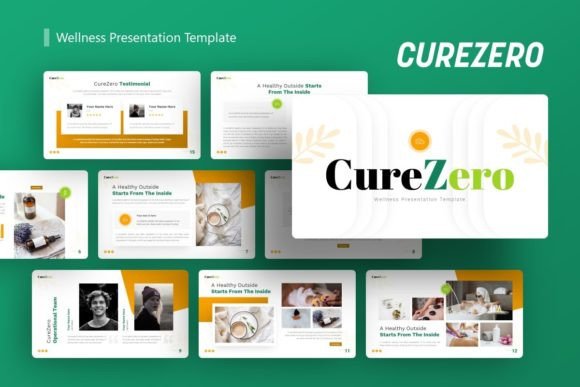
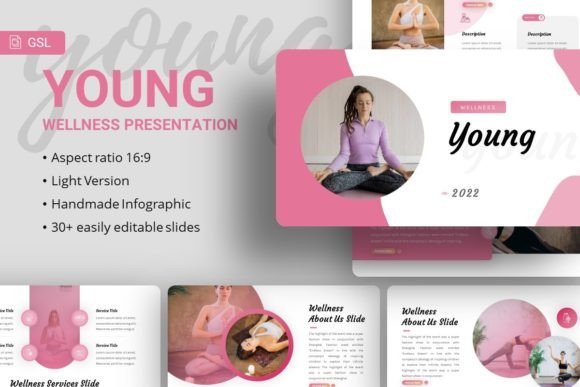
At its core, the Young Wellness template is a pre-designed set of slide layouts for use within Google Slides. It's not a standalone software, but a sophisticated template file—a .PPTX PowerPoint file—that you import into Google Slides or PowerPoint. This provides a cohesive visual framework, ensuring every slide you create maintains a consistent style. The template comes with 35 unique slides, each crafted to serve different presentation purposes. Its defining characteristic is a contemporary aesthetic often associated with wellness, creativity, and youthful energy, featuring balanced typography with fonts like Karla and Courgette, and pixel-perfect illustrations.
The Core Value: Efficiency and Professional Polish
The primary appeal of the Young Wellness Google Slides template is its ability to bridge the gap between having great content and presenting it compellingly. Many individuals, from freelancers to small business owners, possess the substance for their presentation but lack advanced design skills or the time to meticulously style each slide. This template solves that problem by providing a handcrafted, professional design structure.
Its value lies in several practical features:
- Easy Customizable Contents: Every text box, shape, and placeholder is ready for you to edit. You don't need to wrestle with alignment or color schemes.
- Resizable and Editable Graphics: The included infographics and illustrations are vector-based, meaning you can scale them to any size without losing quality and change their colors to match your brand.
- Drag-and-Drop Picture Placeholders: This is a boon for photographers, bloggers, or anyone using many images. Simply drag your photo into the designated area, and it automatically fits the frame.
- Master Slide Foundation: Changes made to the master slides—like logos or background styles—can propagate throughout your presentation, ensuring global consistency with minimal effort.
Where You Can Use This Versatile Template
The described use cases are remarkably broad. The Young Wellness design isn't limited to health or wellness topics; its clean and modern feel makes it adaptable. A creative agency might use it for a client pitch deck to showcase a fresh brand identity. An entrepreneur could employ it for a startup pitch, where the template’s energetic yet professional look helps convey innovation. Educators or trainers might adapt it for course modules or workshop materials, where clarity is key.
Consider these realistic scenarios:
- A freelance graphic designer creates a personal portfolio presentation to send to potential clients, using the template's sleek layout to frame their work.
- A marketing professional at a small company builds the annual corporate business review, utilizing the built-in charts and infographics for data visualization.
- A blogger preparing for a speaking engagement at a conference uses the template to structure their talk, saving hours of design work.
Important Considerations Before You Dive In
While the Google Slides Young template offers significant advantages, it's wise to understand a few details for a smooth experience. First, the template is a file you purchase or download; it is not a built-in feature within Google Slides. You'll need to upload the .PPTX file to your Google Drive and open it with Google Slides, or use it directly in PowerPoint.
A key note is regarding images. The promotional demos show beautiful photos from sources like Unsplash, Pixabay, and Pexels, but those images are for preview only and are not included in the downloaded files. You will need to source your own imagery to populate the drag-and-drop placeholders. This is actually beneficial, as it allows you to personalize the presentation completely with your own photos, product shots, or branded visuals.
The included documentation file and vector icons are valuable resources. The documentation typically guides you through the customization process, while the vector icons provide additional graphical elements you can use across your slides for enhanced visual communication.
Aligning the Template with Your Goals
Choosing a template like Young Wellness should be driven by your specific needs. If your goal is to create a presentation that feels contemporary, approachable, and visually cohesive without requiring a graphic designer, this template aligns perfectly. It supports the need for speed, professionalism, and aesthetic appeal. For a hobbyist creating a club presentation or a professional crafting a client report, it removes design as a barrier, allowing focus on the message itself.
However, if your brand requires a very specific, dark, or highly technical aesthetic not aligned with this template's "young wellness" vibe, you might need to explore other options. Fortunately, the high level of customization—being able to change colors, resize all graphics, and edit text—means you can often adjust the feel significantly to suit your tone.
Final Thoughts on a Practical Design Solution
The Introducing Young Wellness Google Slides Template represents a practical solution in a world where visual communication is paramount. It empowers beginners and casual users to produce work that looks expert, while also saving valuable time for busy professionals, marketers, and educators. By providing a structured yet flexible design system, it turns the often-daunting task of slide creation into a more manageable and even enjoyable process.
Whether your context is business, creative, educational, or personal, leveraging a well-crafted template like this can elevate your content, ensuring your ideas are received not just heard. Remember that the ultimate success of your presentation still hinges on your unique content and delivery, but with a tool like Google Slides - Young, you have a strong, stylish, and supportive foundation from which to build.