BitWave Blockchain Presentation Template Explained
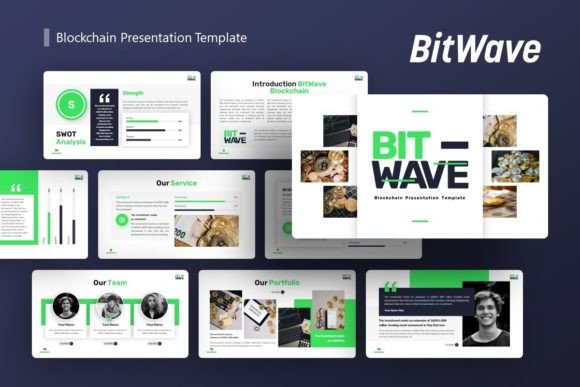
If you've ever needed to explain the complex world of blockchain to an audience, you know the challenge. It's a technical subject that requires clear visuals and a structured narrative to make it understandable. The Blockchain Presentation - BitWave is a professional PowerPoint template designed specifically for this task. In simple terms, it's a ready-made slide deck that provides the visual framework and content structure for a compelling presentation about blockchain technology.
More Than Just a Blockchain Slideshow
While its core design is built around blockchain themes, the BitWave template's true value lies in its versatility. The template includes 36 unique slides, each crafted with a modern, tech-forward aesthetic. The "Introducing BitWave" part of the title highlights its primary use: to introduce and explain blockchain concepts. However, because its design is clean, professional, and built on master slides for consistent styling, it can be easily adapted for a wide array of purposes beyond just crypto talks.
Imagine you're a startup founder pitching your new fintech app. You could repurpose the infographics and data slides to showcase your market analysis. A creative agency might use the bold, geometric layouts to present a brand portfolio. A freelancer could turn it into a personal portfolio by swapping in their photography using the drag-and-drop picture placeholders. This flexibility is a key characteristic, making it a single solution for many presentation needs.
Key Features That Simplify Your Work
Creating a professional presentation from scratch consumes valuable time. The BitWave template addresses this by offering several practical features:
- Easy Customizable Contents: Every text box and title is ready for you to edit. You aren't locked into pre-written content; you fill the structure with your own message.
- Handcrafted Infographics: Instead of building complex charts yourself, the template provides pixel-perfect illustrations for processes, hierarchies, and data visualizations common in blockchain explanations.
- Resizable and Editable Graphics: All icons, shapes, and diagrams are vector-based within PowerPoint. You can change their color, size, and position without losing quality to match your brand.
- Practical Included Files: You receive the core PowerPoint .PPTX file, a documentation file to help you navigate the template, and a set of vector icons for further customization.
A crucial note for users is that the impressive demo images are for preview only. The actual files provide the placeholder structure, meaning you add your own relevant photos and screenshots. This keeps the template file size manageable and ensures your final presentation is uniquely yours.
Who Benefits from This Template and Why?
The audience for this tool is broad. It supports the goals of anyone who needs to communicate ideas visually with authority and clarity.
Educators and Trainers: For those teaching blockchain courses or corporate workshops, the template provides a sequential flow to explain concepts from basics to advanced applications, saving hours of slide design.
Entrepreneurs and Startup Teams: Crafting a pitch deck is critical for fundraising. Using a polished template like BitWave instantly elevates the professionalism of a pitch, allowing founders to focus on refining their narrative rather than design details.
Marketers and Consultants: When proposing a new blockchain-based marketing strategy or a consultancy project to clients, a visually coherent presentation builds trust and aids comprehension.
Freelancers and Creators: A photographer or designer can use the template for a personal portfolio. The clean layouts allow their work to be the focus, while the template provides a sophisticated backdrop.
The common problem it solves is time. It eliminates the blank-page dilemma and the struggle to create visually consistent slides. It also addresses the knowledge gap for beginners in design; even someone with minimal PowerPoint expertise can produce a high-quality result by following the master slide structure and using the drag-drop features.
Realistic Applications in Daily Contexts
Consider a small business owner who needs to explain to their team how they plan to integrate a blockchain-based supply chain tracker. They could use the BitWave template's process flow slides to map out the new system. A blogger creating a video course on cryptocurrency could export the slides as key visuals for their screen recordings. An in-house corporate team presenting a new internal tokenization policy to management would benefit from the template's corporate-ready aesthetic.
The value is not just in the blockchain-themed graphics, but in the underlying presentation architecture. The master slides ensure every slide has the same font, color palette, and alignment, which is often the hardest part for casual users to maintain consistently.
Important Considerations Before You Use It
As helpful as the BitWave Blockchain Presentation template is, it's wise to consider a few points before diving in. First, assess your own comfort with PowerPoint. While it's designed to be easy, customizing vector graphics and using master slides requires a basic familiarity with the software. The included documentation file is there to help bridge this gap.
Second, remember that the template is a starting point. Its strength is its structure and style, but the impactful content must come from you. You will need to supply the compelling text, data, and your own images to fill the placeholders. Think of it as a high-quality frame for your picture.
Finally, while it's versatile, its default visual language is modern and tech-oriented. For a presentation needing a very soft, traditional, or artistic vibe, you might need to do more substantial customization of colors and graphics. However, for most business, startup, educational, and portfolio contexts, its style is immediately appropriate.
Moving Forward with Your Presentation Project
When you decide that the BitWave template fits your needs, the process is straightforward. After acquiring the files, open the .PPTX file and start by reviewing the master slides to understand the design system. Replace the demo text on each slide with your own script. Use the picture placeholders to insert your logos, product photos, or team headshots. The handcrafted infographics are there to be tweaked—change the text in a process diagram to match your specific workflow, or adjust the colors on a data chart to align with your brand.
By leveraging this template, you shift your energy from how to design the slides to what to say on them. This is where the true appeal lies: it empowers you to communicate more effectively, whether you're demystifying blockchain for newcomers, pitching your next big idea, or showcasing your professional work to the world.