Beyond Words: The Power of Hand Gesture Icon Sets
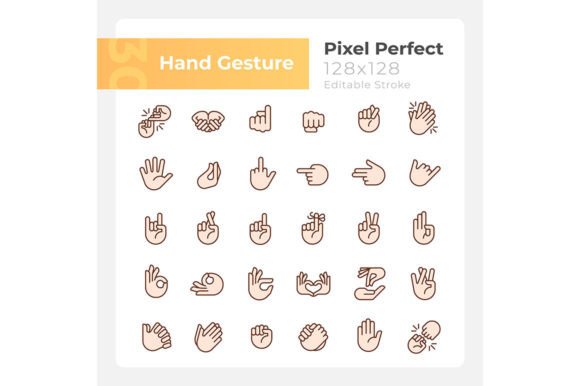
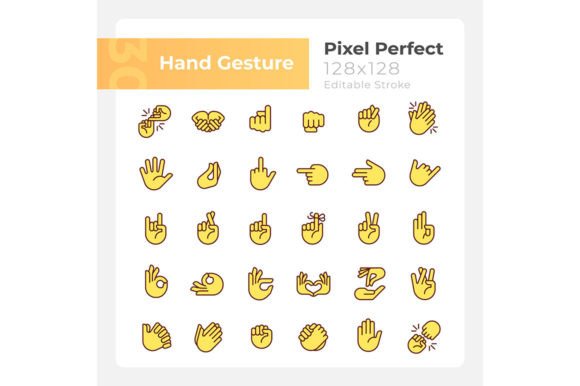
Communication isn't just about what you say. Often, it's about what you show. From a simple thumbs-up to a pointing finger, hand gestures convey meaning instantly, transcending language barriers and adding clarity to any message. For digital creators, capturing this universal language visually requires a toolkit that is both precise and versatile. The Hand Gestures Svg Color Icon Set offers exactly that—a curated collection of 30 pixel-perfect RGB color icons designed to elevate your projects.
This set is more than just a bundle of images; it's a foundational asset for anyone who communicates visually. Each icon is an isolated vector illustration, crafted as a simple filled line drawing. The use of bold, vibrant RGB colors ensures they stand out with clarity, while the editable stroke feature gives you complete control over their final appearance. Whether you're sketching a wireframe in a brainstorming session or polishing a final product, these icons adapt to your needs.
Crafted for Precision and Flexibility
What defines a truly useful digital asset? It's the details that matter in implementation. The Hand Gestures Svg Color Icon Set is built with specific qualities that address real designer and developer needs.
First, the "pixel-perfect" promise isn't just a buzzword. It means each icon is constructed with clean lines and intentional alignment, ensuring they render crisply at any size—from a tiny app button to a large banner graphic. This eliminates fuzzy edges or awkward scaling artifacts that can undermine professional presentation.
The inclusion of multiple file formats—EPS, SVG, PNG, JPEG, and AI—is a critical strength. The SVG files provide scalable vector graphics perfect for web use and modern interfaces, while the PNG and JPEG formats offer ready-to-use raster images for quick placements. The EPS and AI files cater to professional print workflows and deep editing within Adobe Illustrator. This multi-format approach means you can integrate the set into virtually any project phase or software environment without conversion headaches.
Typography also plays a subtle role. The recommended use of Montserrat Bold and Light fonts for accompanying text creates a harmonious, contemporary aesthetic when the icons are used in layouts. This thoughtful consideration of typographic pairing helps maintain visual cohesion across your entire design.
Real-World Applications Across Industries
The utility of a well-designed hand gesture icon set spans far beyond a single niche. Its applications touch numerous fields, each leveraging the icons to solve specific communication challenges.
For app developers and UX designers, these icons serve as intuitive UI elements. A "stop" hand gesture can denote a cancel action, a "peace sign" might indicate a successful completion, and pointing fingers can guide user navigation. They enhance user experience by providing familiar, non-textual cues that improve interface intuitiveness.
Marketers and content creators can weave these icons into social media graphics, blog post illustrations, email campaigns, and brochure infographic templates. A graphic about teamwork benefits from a "handshake" icon; a post on agreement can use a "thumbs-up." They act as visual shorthand, making complex concepts accessible and boosting engagement through recognizable symbolism.
In educational materials and corporate training modules, educators and instructional designers can use the set to create clear, engaging visuals. Diagrams explaining communication skills, presentations on body language, or handouts about non-verbal cues become more effective when supported by these clean illustrations. They help break down abstract ideas into concrete visual examples.
Entrepreneurs and small business owners find value in using such assets for branding and internal documentation. Consistent icon use across pitch decks, process diagrams, and internal wikis establishes a professional visual language, reinforcing brand identity and improving clarity in internal communications.
Integrating Icons Into Your Workflow
Adopting a new asset set like the Hand Gestures Svg Color Icon Set requires some practical considerations to maximize its value. Start by auditing your current projects and future plans. Where could a visual cue replace or supplement lengthy text? Identify touchpoints in user journeys, presentation slides, or published content that feel text-heavy or ambiguous.
When evaluating the set, focus on its completeness for your needs. Does it contain the specific gestures you require—like "open hand," "fist," or "victory sign"? The 30-icon scope offers a broad foundation, but ensure it aligns with your thematic requirements. The RGB color palette is vibrant and modern, suitable for digital-first projects, but also easily recolorable via the editable stroke in vector formats to match any brand scheme.
Implementation is straightforward. For digital projects, drag-and-drop the PNGs for quick prototyping. For final, scalable outputs, use the SVG files in web code or the AI files for print design. Remember to maintain consistency; using the same icon style across all related materials builds a stronger, more recognizable visual system.
The Tangible Benefits of Visual Consistency
Investing in a dedicated, high-quality icon set delivers measurable advantages. It streamlines production, saving hours spent searching for disparate icons or creating them from scratch. This efficiency directly impacts productivity, allowing you to focus on core creative or strategic tasks.
It elevates professional appearance. Uniform style, sharp rendering, and thoughtful color use make your outputs look crafted and cohesive, which builds trust with clients, users, and audiences. In commercial contexts, this polished look enhances brand perception.
It improves communication effectiveness. Icons can convey actions, emotions, and concepts faster than text, especially in global contexts or for audiences with varying literacy levels. This makes your message more inclusive and easier to understand.
Finally, it fosters creative confidence. Having a reliable, versatile visual component at your disposal encourages experimentation in layout and storytelling. You can combine icons into new infographics, sequence them to show processes, or use them as focal points in minimalist designs.
Building a Library of Creative Assets
The Hand Gestures Svg Color Icon Set is part of a broader creative ecosystem. Studios like BSD Studio often produce such sets alongside complementary resources like brochure infographic templates and mobile app screen pages. Their model of releasing new topics and discounts weekly highlights an important strategy for continuous creators: building a personal library of assets.
By subscribing to such services, you gradually accumulate a tailored toolkit. This proactive approach means you're never starting from zero on a new project. You have a foundation of icons, templates, and styles that you know and can adapt quickly. It turns individual purchases into a long-term investment in your creative capability and output speed.
Whether you're a freelancer assembling a client presentation, a blogger designing a featured image, or a product team mocking up a new feature, these resources shift the effort from asset creation to asset application—where your unique ideas and expertise truly shine.
The essence of effective digital communication lies in pairing great ideas with great visuals. The Hand Gestures Svg Color Icon Set provides one of those essential visual tools. By offering technical precision, format flexibility, and universal symbolic meaning, it enables professionals across fields to design with clarity, communicate with impact, and produce work that stands out through thoughtful, consistent detail.