Beyond the Pitch Deck: How the Igenio Creative Presentation Adapts to Your Story
You have a story to tell. It might be the origin of your startup, the portfolio of your creative work, the annual strategy for your team, or a personal project you're passionate about sharing. The challenge isn't having the content; it's structuring it in a way that feels coherent, compelling, and visually polished without spending weeks designing slides from scratch. This is where a versatile template like the Igenio Creative Presentation shifts from being just a digital product to being a practical tool in your workflow.
What Is the Igenio Creative Presentation?
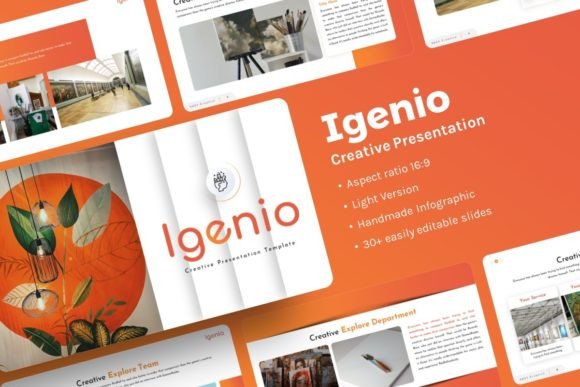
Think of it not as a single, rigid deck, but as a structured design system for PowerPoint. It provides a clean, contemporary canvas of 30 slides, built on master slides so your font and color choices apply consistently. The infographics are handcrafted, not generic clipart, meaning they look professional but can be edited. The illustrations are pixel-perfect and resizable. You can drag and drop your own photos into placeholder areas. It comes as a .PPTX file, ready to open in the software you already likely have, accompanied by documentation and vector icons. The images shown in demos are from free sources like Unsplash, a reminder that you populate it with your own visuals. In essence, it's a starting framework, designed to be customized.
The Real-World Moments When a Flexible Template Matters
Consider the last time you needed to put together a presentation quickly. Perhaps a potential client asked for a company profile overview "by tomorrow." Maybe you finally decided to organize your photography work into a presentable portfolio to share on your website. Or an investor meeting was suddenly scheduled. In these scenarios, opening a blank PowerPoint slide induces a minor panic. You spend hours on layout instead of message. The Igenio Creative Presentation eliminates that initial design hurdle. You begin with a visually coherent structure, so your energy focuses on what you're saying, not how it looks.
For the Creative Professional and Freelancer
If you're a designer, marketer, photographer, or freelancer, your presentations are often your visual credibility. A pitch for a branding project needs to reflect good design itself. Using a template with handcrafted infographics and resizable illustrations means you can showcase your proposal or past work within a layout that feels intentional. You can replace the placeholder images with shots from your latest campaign or design portfolio seamlessly. It allows you to present your creative services within a creatively presented format, maintaining a professional narrative from the first slide to the last.
For the Startup Founder and Small Business
The startup journey is a story of problem, solution, market, and vision. Pitch decks are critical, but so are internal presentations for your team, or simple business overviews for partners. A template based on master slides ensures that whether you're presenting to investors (using the more data-driven slides) or to your new hires (using the team or process slides), the visual language is consistent. This builds a subtle brand identity even in internal documents. The easy customization means you can adapt the same core deck for different audiences without starting over each time.
For the Educator, Blogger, and Content Creator
Presentations aren't just for boardrooms. An educator might use it to structure a workshop or online course module. A blogger might transform a complex article into a visual slide deck to share on social media. A hobbyist creating a personal portfolio about their travel or craft projects needs a clean way to organize photos and narratives. The drag-and-drop picture placeholder feature is key here. It turns the process from technical to intuitive—just insert your images and adjust the text. The result is a shareable, visually appealing package that elevates your content beyond a simple document.
Connecting Features to Actual Outcomes
Listing "30 slides" is a number; understanding its outcome is different. It means you likely won't need to create new slide layouts. You have a range of options—title slides, content layouts, comparison charts, quote sections, team introductions, data visualizations—so you can sequence your story logically. "Easy customizable contents" translates to: you can change text, colors, and fonts without breaking the design. This gives you control without requiring advanced PowerPoint skills.
"Pixel-perfect illustrations" and "all graphic resizable and editable" mean that the visual elements aren't static images. If you need to tweak an icon color to match your brand, or resize a diagram to fit more text, you can do it within PowerPoint. This prevents the jarring look of mismatched graphics that often happens when piecing together slides from different sources.
The inclusion of documentation and vector icons is a practical support touch. It helps you understand how to use the master slides effectively, and provides additional icon assets you might need for custom points. Knowing the demo images aren't included is an honest prompt: this template is a shell for your own story, requiring your own photos, charts, and data. That's actually beneficial—it forces you to personalize it fully, making the final output uniquely yours.
What to Consider Before Using It
Like any tool, it fits certain scenarios better than others. First, consider your medium. It's a PowerPoint (.PPTX) template, so you need access to PowerPoint or a compatible presentation software. If you work exclusively in Google Slides or another app, this might not be the direct fit.
Second, think about your customization comfort level. While designed for easy editing, it still requires you to input your content, choose colors, and insert images. If you want a presentation where you literally just fill in text fields with no other decisions, this offers more flexibility—which is a plus for originality, but requires a bit more engagement.
Third, align it with your need for visual coherence. If you're creating a one-off, informal slideshow, a simple template might suffice. But if you're building a presentation that represents your professional brand, a creative project, or a multi-use deck you'll adapt over time, the structured design system of the Igenio Creative Presentation pays off. It ensures a polished look across various slide types, which builds viewer trust and engagement.
A Tool for Your Narrative, Not a Replacement for It
The ultimate value of the Igenio Creative Presentation template lies in its adaptability. It doesn't force you into a single story. It provides the visual architecture for many stories: the startup story, the creative portfolio story, the business report story, the educational lecture story, the personal passion story. By removing the initial design burden, it lets you focus on the most important part—clarifying and conveying what you want to say. You start with a professional baseline, and through your content and customizations, you make it distinctly yours. That combination of structured design and personal input is what turns a generic presentation into an effective communication tool, matching the many roles you might play—creator, entrepreneur, educator, or storyteller.